User Roles and Permissions in Business Apps: A Complete Guide
RBAC explained simply. 5 common role models, GDPR security, and real SME case studies.

An intern who can delete the customer database. A salesperson who accesses payroll records. A former employee still logging in 6 months after departure. These aren't disaster scenarios — they're situations dozens of SMEs experience every year because of a poorly designed permissions system.
Role and permission management (RBAC: Role-Based Access Control) isn't a developer topic. It's a matter of security, productivity, and GDPR compliance. Who can see what, modify what, delete what — these decisions directly impact data protection and team efficiency.
This article explains RBAC simply, presents the 5 most common role models, and gives best practices for securing your business application.
Why permissions are critical
The risk without role management
Without a permissions system, every user accesses everything. It's like giving every employee keys to every office, including the safe.
Real consequences:
- Data leaks — A salesperson accesses supplier margins and inadvertently shares them
- Costly errors — A user modifies or deletes data they shouldn't have touched
- GDPR non-compliance — Accessing personal data without legitimate reason is a violation (learn more)
- Lost traceability — Impossible to know who did what and when
RBAC explained simply
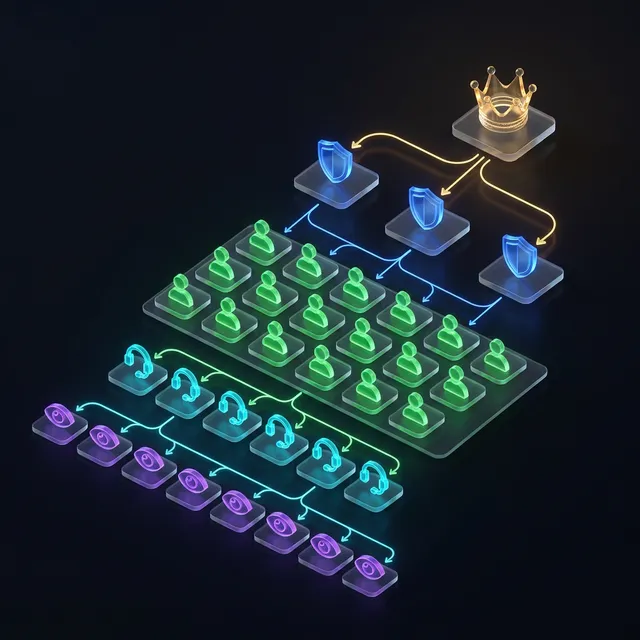
RBAC (Role-Based Access Control) works on 3 levels:
- User — Each person has a unique account
- Role — Each user is assigned one or more roles (e.g., sales, accountant, administrator)
- Permissions — Each role has a set of rights (view, create, edit, delete) on each resource (clients, invoices, reports)
Think of RBAC as an office building access badge: the badge opens certain doors, not all. And each employee has a different badge based on their function.
The 5 common role models for SMEs
Model 1 — Simple hierarchy (3 roles)
Suited for SMEs of 5–15 people.
| Role | Permissions |
|---|---|
| Administrator | View, create, edit, delete everything. Manage users |
| User | View and create own data. Edit shared data |
| Viewer | View only. No modifications possible |
Model 2 — By department (5 roles)
Suited for SMEs of 15–50 people.
| Role | Access |
|---|---|
| Management | Everything (dashboards, financial data, HR) |
| Sales | Clients, quotes, orders. No access to margins or salaries |
| Accounting | Invoices, payments, cash flow. No access to prospects |
| Operations | Interventions, planning, inventory. No financial access |
| Support | Tickets, client history. Read-only access to quotes |
Model 3 — Hierarchical with delegation (scope)
A team manager sees their team's data but not other teams'. Each salesperson sees their own clients. The sales director sees all clients.
Model 4 — Project-based
Suited for service companies. Permissions are project-linked: a project manager sees everything on their projects but nothing on others'.
Model 5 — Matrix (role + scope + level)
Most complete but most complex. Combines functional role (sales, accounting), geographic scope (Paris office, Lyon office), and hierarchical level (junior, senior, manager).
Sound familiar?
Estimate the cost of your custom tool
In 30 seconds, receive a personalized estimate based on your actual needs.
Comparison: with and without RBAC
| Criteria | Without RBAC | With RBAC |
|---|---|---|
| Sensitive data access | Everyone sees everything | Need-to-know basis |
| Error risk | High (unauthorized modifications) | Low (actions limited by role) |
| GDPR compliance | ❌ Non-compliant | ✅ Compliant |
| Traceability | Impossible (who did what?) | Complete (per-user logs) |
| Onboarding | "Figure it out" | Role-adapted interface, easier adoption |
| Offboarding | Forgetting to remove access | Instant deactivation |
| Administration | Unmanageable beyond 10 users | Scalable to 1000+ users |
Best practices
1. Principle of least privilege
Each user should only access data strictly necessary for their work. No more. When in doubt, start with restricted access and expand if needed.
2. Separation of sensitive roles
No user should be able to create AND validate a critical operation (invoice, transfer, order). Task separation is a fundamental security principle.
3. Quarterly access review
Every 3 months, review the active user list. Immediately deactivate departed employees' accounts. Verify roles still match current functions.
4. Activity logs
Record who does what and when. If problems occur (modified data, accidental deletion), logs identify the cause and enable data restoration.
5. Role-adapted interface
A user should only see menus and functions for their role. Hiding inaccessible menus reduces confusion and improves ergonomics.
Ready to take the next step?
Let's talk about your project
Free analysis of your needs, no commitment. We respond within 24 hours.
Real case: RBAC implementation
Profile: Consulting firm, 28 employees. Mission management business application.
Before RBAC: All consultants accessed everything — including billing, margins, and HR data. A junior consultant accidentally modified a framework contract's daily rate. Another time, a departing employee downloaded the entire client list before their last day.
Roles implemented:
- Administrator (2): full access, user management, system configuration
- Manager (4): their missions + team's, read-only financial access, approval workflows
- Consultant (18): own missions only, no financial access, no data export
- Support (3): ticket management, read-only client access, no deletion rights
- Accountant (1): full financial access, no technical mission details
Implementation process:
- Workshop to map current access patterns (who accesses what today?)
- Permission matrix validated by management
- Progressive rollout: managers first, then team-by-team
- Training on the new interface (simplified by role)
- Monthly review for the first quarter
Results:
- Data incidents: 5/month → 0
- Onboarding time: 2 days → 1 day (simplified role-based interface)
- GDPR compliance: audit passed successfully
- Employee satisfaction: +25% (less noise, only relevant menus visible)
Implementation checklist
Before deploying RBAC, verify every item:
- All user profiles identified and documented
- Permission matrix validated by management (not just IT)
- Principle of least privilege applied to every role
- Sensitive actions require approval (deletion, export, financial modifications)
- Employee departure process includes immediate account deactivation
- Activity logs enabled for audit trail
- Quarterly access review scheduled
- Security tests confirm no role can access unauthorized data
Common RBAC mistakes in SMEs
Avoid these pitfalls when implementing role management:
Too many roles: a 20-person company doesn't need 15 roles. Start with 3-5 and expand only when specific needs arise.
The "super admin" trap: giving one person unrestricted access creates a single point of failure and a security risk. Even administrators should have their actions logged and their most destructive capabilities (delete database, export all data) require confirmation.
Set-and-forget permissions: roles should be reviewed when employees change positions, not just when they join or leave. A person promoted from sales to management may still carry their old sales permissions — and now has both.
Our approach at Iselia Projects
At Iselia Projects, role management is integrated from the requirements document phase.
- Role mapping — We identify each user profile and access needs with you
- Permission matrix — A clear document listing each role, resource, and right
- Security testing — Verification that no role can access unauthorized data
- Simple administration — Admin interface to add, modify, or deactivate a user in 30 seconds
Discover our support packages →

RBAC and regulatory compliance
Beyond GDPR, role management addresses multiple regulatory requirements:
- SOC 2 — Requires demonstrable access controls and audit trails
- ISO 27001 — Mandates information security management including access restrictions
- Industry-specific — Healthcare (HIPAA), finance (PCI-DSS), and legal sectors have strict access requirements
For SMEs, GDPR compliance is usually the primary driver. But implementing RBAC properly positions your application for future compliance needs as your company grows and enters regulated markets.
Audit preparation tip: maintain an up-to-date access matrix document showing every role, every resource, and every permission. Reviewers love clear documentation — it demonstrates intentional security design rather than ad-hoc access grants.
Frequently Asked Questions
How many roles should I define?
3–7 roles cover 90% of SME needs. Too many roles makes management unwieldy. Start simple (administrator, user, viewer) and refine progressively if needed.
Is RBAC mandatory for GDPR?
GDPR requires "legitimate need" access to personal data. RBAC isn't explicitly mandatory but is the best way to prove compliance during an audit. Without RBAC, demonstrating access is limited to strict necessity is nearly impossible.
Can a user have multiple roles?
Yes. A CEO who is also in sales can have both roles. Permissions accumulate: they'll access everything both roles authorize.
How to handle employee departures?
The ideal process: account deactivation on departure day, not deletion (historical data remains). The application should allow deactivating an account in 1 click from the admin interface.
Does RBAC work with SSO (Single Sign-On)?
Yes, perfectly. SSO handles authentication (who are you?), RBAC handles authorization (what can you do?). Both are complementary and independent.
How much does RBAC implementation cost?
RBAC represents 5–10% of development budget. For a €30,000 project, budget €1,500–3,000. It's a minimal investment compared to a security incident's cost.
Conclusion: security starts with permissions
Role and permission management isn't a technical luxury — it's a security, productivity, and compliance prerequisite. Each user should only see what they need, modify what's their responsibility, and never be able to delete critical data.
The 5 models presented cover 95% of SME needs. The cost is minimal (5–10% of the project), the benefits immediate (zero incidents, GDPR compliance).
Your app lacks role management? At Iselia Projects, the security audit is free and obligation-free. In 30 minutes, we identify vulnerabilities and recommend the right role model. Request your free security audit →
Ready to go custom?
Need a custom business tool?
Let's discuss your project. Free analysis, no commitment.