API-First and Open Architecture for Your Business App
API-first explained, concrete benefits, use cases, and REST/GraphQL standards for SMEs.
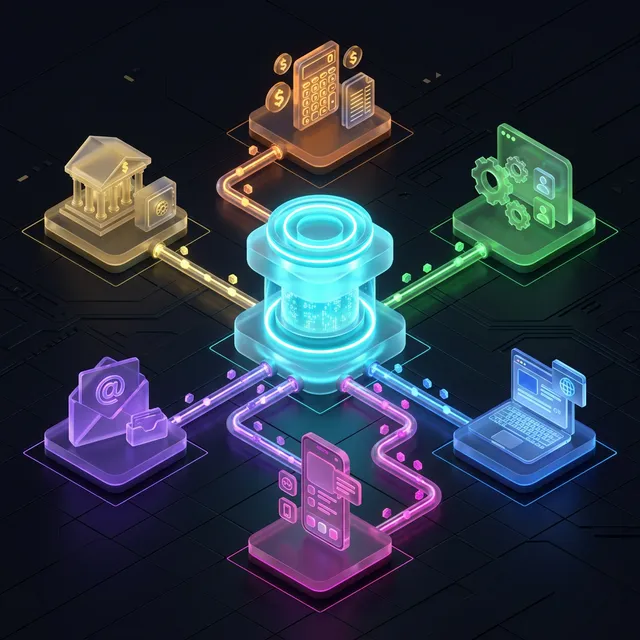
Your business app is an isolated island. It doesn't talk to your accounting, your CRM, or your website. Every time you need to transfer data, it's CSV export, copy-paste, manual re-entry. 2h/day wasted. €40,000/year in lost productivity.
The solution? An API-first architecture — designing your application not as a closed system, but as a connected hub that exchanges data with all your tools in real time. APIs transform your application into an extensible platform, capable of adapting to all future needs without rebuilding.
This article explains APIs to non-technical leaders, presents concrete benefits for SMEs, and gives you the keys to choosing the right architecture.
APIs explained simply
What is an API?
An API (Application Programming Interface) is a communication contract between two pieces of software. It's the standardized electrical outlet that lets any device connect to the network.
Concretely: when your business app creates an invoice, the API automatically sends it to your accounting software. When a customer places an order on your website, the API automatically creates the order in your business app. Zero re-entry, zero delay, zero errors.
API-first: designing for openness from the start
The API-first approach means the API is designed before the user interface. The application is built on an open data foundation accessible by any authorized system.
Key advantage: your app can be used via a web interface, a mobile app, an executive dashboard, an external partner — everything goes through the same API. One system, multiple uses.
5 concrete benefits for your SME
1. Zero data re-entry
The #1 enemy of productivity: manual re-entry between systems. APIs eliminate this problem by synchronizing data in real time between your tools.
Concrete gain: 1-3h/day/employee on data entry tasks. For a 10-person team, that's the equivalent of 1.5 FTEs recovered. No more copy-paste errors, no more forgotten updates, no more conflicting versions.
2. Connected ecosystem
Your business app doesn't replace all your tools — it orchestrates them. Via APIs, it connects to your accounting (Sage, Pennylane), your CRM (HubSpot, Pipedrive), your website, your e-commerce solution, and more.
The result is a unified data flow where information entered once propagates everywhere automatically. See our integration guide for technical details.
3. Maximum evolvability
With an API, you can add new tools without modifying your application. A new invoicing software? It connects via the API. A partner who needs access to your product data? The API handles it. This is the foundation of scalability.
Your application becomes future-proof: whatever tool emerges in 2 or 5 years, it will connect through the same API.
4. Advanced automation
APIs enable complex automations impossible with isolated tools. Example: a customer orders → the API triggers invoicing → updates stock → sends a confirmation email → creates a delivery task. All automatically, in seconds, without human intervention.
These automation chains eliminate repetitive tasks and free your team for higher-value work.
5. Technology independence
With an API, you're not locked into a proprietary ecosystem. You can change your invoicing provider, CRM, or hosting without touching your application's core. No vendor lock-in.
This independence protects your investment: your application adapts to your tool choices, not the other way around.
Sound familiar?
Estimate the cost of your custom tool
In 30 seconds, receive a personalized estimate based on your actual needs.
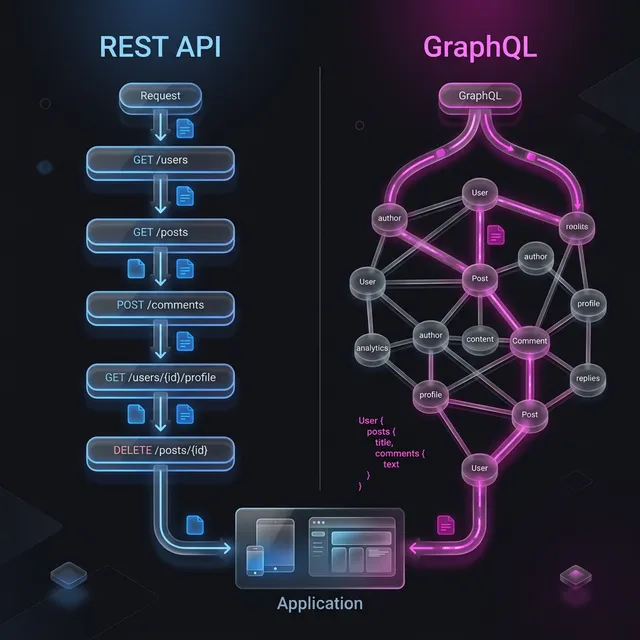
REST vs GraphQL: which standard?
| Criteria | REST | GraphQL |
|---|---|---|
| Simplicity | ⭐⭐⭐⭐⭐ | ⭐⭐⭐ |
| Flexibility | ⭐⭐⭐ | ⭐⭐⭐⭐⭐ |
| Performance | Good (but over-fetching possible) | Optimal (exact data requested) |
| Ideal use case | Standard CRUD, simple integrations | Complex dashboards, mobile apps |
| Maturity | 20+ years, universal | 10 years, growing fast |
| Recommended for SME | ✅ In 80% of cases | ✅ If complex dashboards |
Our recommendation: REST for most SME projects. GraphQL when the app has complex data needs.
Comparison: with and without API
| Criteria | Without API (closed) | With API (open architecture) |
|---|---|---|
| Data exchange | CSV export/import, copy-paste | Real-time sync |
| Re-entry time | 1-3h/day/employee | 0 |
| Entry errors | 5-10% | < 0.1% |
| Adding a new tool | Specific development (weeks) | API connection (days) |
| Mobile app | Complete new development | Same API, new interface |
| External partners | Email/file exchanges | Secure API access |
| Total cost | High long-term | Optimized |
Ready to take the next step?
Let's talk about your project
Free analysis of your needs, no commitment. We respond within 24 hours.
Real case: API in action
Profile: Construction services company, 35 employees. Site management application.
Before API: site data (hours, materials, photos) was entered on paper, then in the app, then transcribed to accounting. 3 entries for the same information.
API integrations implemented:
- Accounting (Pennylane): invoices and work orders synced automatically
- Planning (Google Calendar): interventions visible on technicians' calendars
- Banking (banking API): automated payment reconciliation
- Suppliers: material orders sent directly from the app
Results:
- Data entry time: 3h/day → 15 min/day
- Billing errors: 8%/month → 0.2%/month
- Billing delay: D+15 → D+1
- ROI: 280% at 12 months
Webhooks: APIs that push data to you
While traditional APIs require you to request data (pull), webhooks push data automatically when events occur:
- A customer places an order → webhook notifies your billing system instantly
- An invoice is marked "paid" → webhook updates your CRM
- A support ticket is closed → webhook triggers a satisfaction survey
Webhooks are essential for real-time workflows. Without them, you'd need to constantly poll APIs for changes — wasteful and slow.
Implementation tip: always include a retry mechanism. Webhooks can fail silently if the receiving server is temporarily down. The sender should retry 3-5 times with exponential backoff. Most modern frameworks handle this natively.
Webhooks combined with traditional APIs create a complete event-driven architecture where your systems react to changes instead of constantly checking for them.
API security
An open API doesn't mean an unsecured API. Security best practices:
- Authentication: every API access requires a token (OAuth 2.0)
- Authorization: RBAC applied to API access
- Encryption: all communications over HTTPS/TLS
- Rate limiting: request limits to prevent abuse
- Logging: every API call is traced and auditable
Our approach at Iselia Projects
At Iselia Projects, API-first architecture is our development standard:
- API designed first — Before the interface, we define data and exchanges
- Automatic documentation — OpenAPI/Swagger so any system can integrate
- Native security — Authentication, authorization, and encryption built-in
- Integration tests — Every API connection is tested automatically
- Integration support — We connect your existing tools
Discover our support packages →
API documentation: a strategic asset
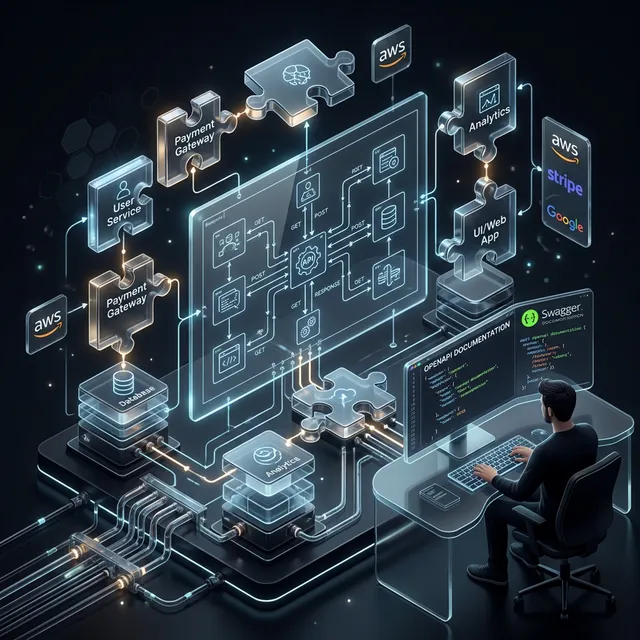
An undocumented API is worthless. Your API documentation should include:
- Endpoint reference — Every URL, method (GET/POST/PUT/DELETE), parameters, and response formats
- Authentication guide — How to obtain and refresh API tokens
- Code examples — Copy-paste examples in at least 2 languages (JavaScript, Python)
- Error handling — What each error code means and how to resolve it
- Rate limits — How many requests per minute are allowed, and what happens when exceeded
- Changelog — Version history so integrators know what changed and when
Tools like Swagger/OpenAPI generate interactive documentation automatically from your code. Your integrators (and your future self) will thank you.
The best APIs feel invisible: they work exactly as expected, with no surprises. That predictability comes from excellent documentation, consistent naming conventions, and comprehensive error messages.
Frequently Asked Questions
Does an API cost more to develop?
API-first adds 10-15% to initial cost. But it drastically reduces future integration costs (3-5× cheaper). Over the 5-year TCO, it's always profitable.
Can I add an API to an existing application?
Yes, but more complex and costly than building it from the start. Budget €5,000-15,000 depending on database and code complexity.
Should my vendor provide API documentation?
Absolutely. An undocumented API is useless. Require up-to-date OpenAPI/Swagger documentation. It's a criterion for choosing a good vendor.
Is an API necessary for a small application?
Even for a small app, a basic API (structured data export, webhooks for notifications) is recommended. It prepares for the future without significant extra cost (5% of budget).
Is GraphQL better than REST?
Not "better" — different. GraphQL excels for complex interfaces (dashboards, mobile apps). REST excels for simple integrations and inter-system communication. Both can coexist.
How to test if the API works correctly?
Tools like Postman allow testing each API endpoint individually. For automated testing, integration tests verify data flows correctly between all connected systems.
Conclusion: the API is your app's nervous system
A business app without an API is an isolated island in a digital ocean. With an API, it becomes the central hub connecting all your tools, eliminating re-entry, and adapting to all future needs.
API-first architecture isn't a technical luxury — it's a strategic investment that pays off from the first integrations. The initial surcharge (10-15%) is negligible compared to productivity and evolvability gains.
Is your app connected? At Iselia Projects, the integrability audit is free and obligation-free. In 30 minutes, we identify priority connections and estimate productivity gains. Request your free integration audit →
Ready to go custom?
Need a custom business tool?
Let's discuss your project. Free analysis, no commitment.